How to Turn Past Articles Into Fresh Writing Ideas Using a dnAI Workflow
How-To · Human dnAI Team
How to Turn Past Articles Into Fresh Writing Ideas Using a dnAI Workflow
Without starting from scratch every time
Who This Is For
- dnAI clients with existing articles, blogs, or long‑form thinking.
- Founders, marketers, and brand leads who want better writing momentum.
- Teams who want ideas that reflect how their thinking and the market have evolved.
What You’ll Achieve by the End
- A complete dnAI workflow you can build step by step.
- A weekly writing prompt delivered straight to your inbox.
- New content ideas grounded in your past work and today’s landscape.
- A system that quietly improves the quality and relevance of your writing over time.
Step‑by‑Step Instructions
Step 1: Upload Your Articles Into the Knowledge Base
Start with your own work.
Upload past articles, blog posts, or essays into your dnAI Knowledge Base. These can come from:
- Your website
- A blog platform
- Long‑form thought leadership
- Internal pieces you still agree with
Why this matters:
The Knowledge Base is dnAI’s source of truth. When your writing lives there, every workflow starts from what you have actually said and believed, not generic assumptions.
Practical tips:
- Upload each article as a separate item.
- Keep original titles and publish dates.
- Clearly label the source, for example “company articles”.
Step 2: Decide What the Workflow Should Do
Keep the goal tight.
This workflow does one thing well: It selects a past article, understands its core ideas, checks how the market talks about that topic now, and creates a fresh blog plan.
It does not rewrite the old article.
It gives you a strong starting point for something new.
Step 3: Create a New Workflow
Go to Automations and create a new workflow.
Name it something clear and descriptive.
Recommended name:
Past article to current landscape
Why this matters:
Clear naming makes workflows easier to trust, reuse, and explain to others later.
Step 4: Add the Start Node
Add a Start node as the entry point.
No configuration needed. This simply defines where the workflow begins.
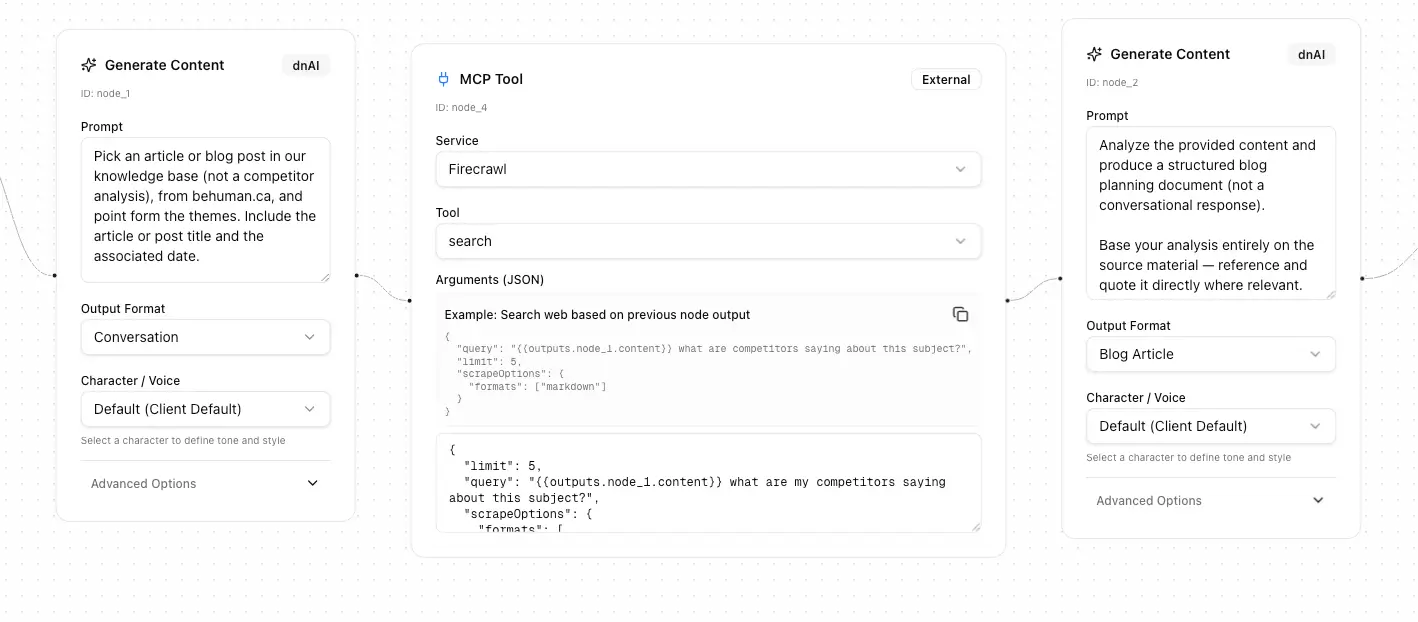
Step 5: Add Generate Content Node (Select a Past Article)
Add your first Generate Content node.
Configure it to:
- Pick one article from the Knowledge Base.
- Use only your own content sources.
- Exclude competitor analysis documents.
- Extract key themes in point form.
- Include the article title and original publish date.
Why this matters:
This step anchors everything in your own thinking. Every run starts from a real piece of work you once stood behind.
Quick check:
- The output should clearly identify the article.
- Themes should be concise bullet points.
Step 6: Add Firecrawl Search Node (Scan the Market)
Add a Firecrawl Search node next.
Configure it to:
- Search for current content on the same subject.
- Limit results to 5.
- Return results in markdown format.
Why this matters:
This adds context. You see how language, framing, and priorities around the topic have shifted since you last wrote about it.
Tip:
- Fewer results keep the signal clear. Five is usually enough.
Step 7: Add Generate Content Node (Create the Blog Plan)
Add a second Generate Content node.
Configure it to produce a structured blog planning document with:
- Conversation summary
- Selected article details
- Main themes in point form
- Draft blog notes (title, date, source summary)
- Article context
- Key points to include
- Potential sub‑sections or themes
- Tone and brand alignment notes
- Summary takeaway
Why this matters:
This is where everything comes together. Instead of a blank page, you get a thoughtful outline that respects your past ideas and reflects the current conversation.
Quality check:
- It should feel like a smart editor’s brief.
- Directional, not over‑written.
Step 8: Add Gmail Send Node
Add a Gmail Send node as the final step.
Configure it to:
- Send to your chosen inbox.
- Subject line: Article content Inspo
- Body: combined outputs from all previous steps.
Why this matters:
Ideas that arrive in your inbox get used. Ideas buried inside tools often don’t.
Step 9: Set the Schedule
Choose when the workflow should run.
Recommended setup:
- Every Wednesday morning.
- Manual run enabled for on‑demand use.
Why this matters:
A predictable rhythm builds momentum. You stop asking “what should I write?” and start reacting to good prompts.
Step 10: Review the Full Flow
Your final workflow should look like this:
Start
→ Generate Content (pick article)
→ Firecrawl Search
→ Generate Content (blog plan)
→ Gmail Send
→ End
Before turning it on:
- Run it once manually.
- Read the email output.
- Adjust prompts if the tone feels off.
Common Mistakes to Avoid
- Uploading articles without titles or dates.
- Letting the workflow generate full articles instead of plans.
- Pulling too many competitor sources and adding noise.
- Forgetting to exclude internal analysis documents.
Optional: Pro Tips
- Duplicate this workflow for different authors or themes.
- Use outputs for talks, newsletters, or LinkedIn posts.
- Pair this with a second workflow that turns approved plans into drafts.
Simple Checklist
- Upload past articles to the Knowledge Base.
- Create a workflow called “Past article to current landscape”.
- Add Start node.
- Add Generate Content node to select an article.
- Add Firecrawl Search node.
- Add Generate Content node for the blog plan.
- Add Gmail Send node.
- Schedule weekly delivery.
- Test once and refine.
Final Thought
Your thinking does not stand still.
Neither should your content.
This workflow gives you a quiet, reliable way to revisit what you have already said, see how the world has changed, and respond with clarity. Over time, it becomes less about finding ideas and more about maintaining continuity, confidence, and forward motion in how you write.
This is what happens when AI is built around you, not everyone else.
Build from your Brand DNA